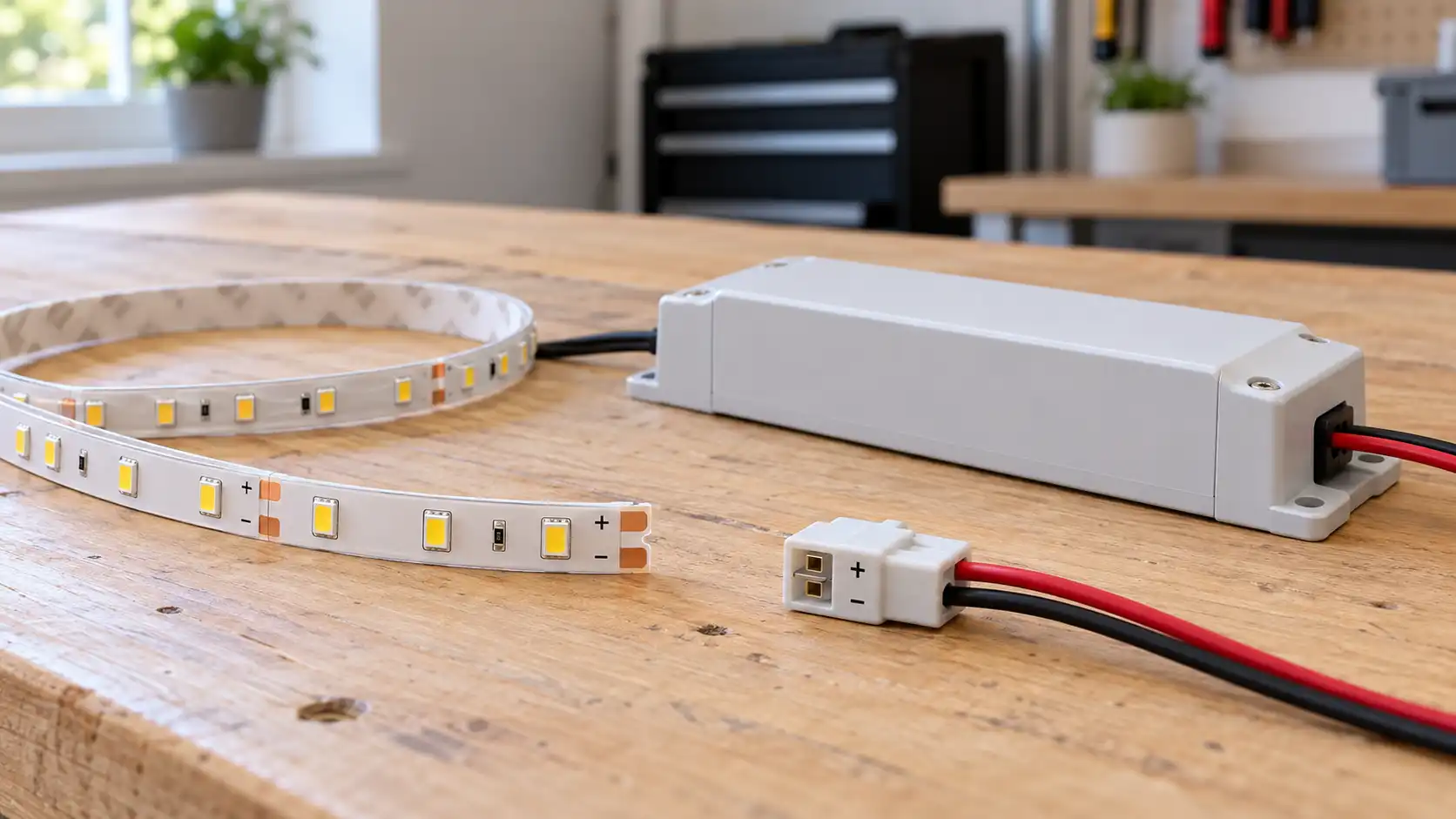
How to Connect LED Strip Lights
15 October 2026
How to Connect LED Strip Lights Safely
To connect LED strip lights, match the strip voltage to the power supply, connect positive to positive and negative to negative, then test the strip before fixing it in place. Most LED tape uses 5V, 12V or 24V DC and must not be connected directly to the UK 230V mains supply.
Quick answer: Check whether the strip is 5V, 12V or 24V, choose a compatible LED driver with enough capacity, connect the correct polarity, and use a suitable controller for RGB or colour-changing tape. Isolate the mains supply before touching any wiring.
What should you check before connecting LED strip lights?
Read the label on the strip, driver and controller before making any connection. Confirm:
The strip voltage: usually 5V, 12V or 24V DC
Whether the strip is single-colour, tunable white, RGB or RGBW
The total length you plan to power
The watts per metre stated by the manufacturer
Whether the strip is for indoor, damp or outdoor use
Where the driver and controller will be positioned
Never connect LED tape directly to a UK plug or lighting cable. Low-voltage LED tape needs a compatible driver or power supply that converts mains electricity to the correct DC output.
What parts do you need to connect LED strip lights?
Part | Purpose |
|---|---|
LED strip | The flexible light tape, rated for a specific voltage. |
LED driver or power supply | Converts mains electricity to the low-voltage DC output required by the strip. |
Controller | Controls brightness, colour or effects on RGB, RGBW and smart strips. |
Connector or cable | Joins the strip to the driver, controller or another strip. |
Aluminium profile | Supports the tape, improves heat dissipation and gives a cleaner finish. |
Heat-shrink tubing or suitable insulation | Protects soldered joints from accidental contact and moisture. |
How do you connect single-colour LED strip lights?
1. Switch off and prepare the work area
Unplug the LED driver and keep the mains input isolated while making low-voltage connections. Work on a clean, dry surface and check the strip for damaged copper pads or torn insulation.
2. Confirm the voltage
The strip and driver must have the same output voltage. A 12V strip needs a 12V DC driver, while a 24V strip needs a 24V DC driver. Do not rely on the connector shape alone because a plug can fit even when the voltage is wrong.
3. Identify the polarity
Single-colour tape normally has a positive pad marked + and a negative pad marked -. Connect the positive output from the driver to the positive strip pad and the negative output to the negative pad.
4. Use a connector or soldered joint
A clip-on connector is suitable when the strip and connector width match. For a more secure joint, solder the wires to the marked copper pads and protect the joint with heat-shrink tubing.
5. Test before installing
Connect the driver to the mains only after checking every connection. The strip should illuminate evenly without flickering, buzzing or becoming unusually hot. Disconnect it immediately if anything smells hot or shows signs of damage.
How do you connect RGB LED strip lights?
RGB strips have separate channels for red, green and blue, plus a common positive connection. They normally require an RGB controller between the power supply and the strip.
Match the driver voltage to the strip voltage.
Connect the driver output to the controller input.
Connect the controller output to the strip’s matching pads.
Match the positive pad and each colour channel correctly.
Test the remote, app or control buttons before mounting the strip.
If the colours appear in the wrong order, switch off the power and check that the controller’s channel labels match the strip pads. Do not guess connections on an RGBW strip because it has an additional white channel.
How do you join two LED strips?
You can join strips with compatible clip connectors or by soldering wires between the copper pads. Check the manufacturer’s maximum continuous length before connecting a second reel.
For longer runs, powering the strip from one end can cause voltage drop. The far end may look dimmer or change colour. Depending on the product, the solution may be power injection, a parallel connection, a larger driver or a separate controller.
Do not exceed the controller’s current rating. A controller that is too small can overheat or shut down.
Where can LED strip lights be cut?
Cut only at the marked cut lines, usually shown by a scissors symbol or a line across the copper pads. Cutting between marked points can permanently damage that section of tape.
After cutting, seal exposed ends where required by the manufacturer. Waterproof strips need an appropriate end cap and sealant if they are being used in a damp or outdoor location.
How do you choose the correct LED power supply?
Multiply the strip’s watts per metre by the total length. Then choose a driver with spare capacity rather than operating it at its maximum rating continuously.
For example, a strip rated at 10 watts per metre and used for 4 metres has a total load of 40 watts. The correct driver must provide the same voltage and enough wattage for that load, with a sensible safety margin.
Check | What must match? |
|---|---|
Voltage | Driver output and strip rating must be identical. |
Wattage | Driver capacity must exceed the total strip load. |
Current | Controller and cable ratings must handle the strip’s current. |
Environment | IP rating must suit kitchens, bathrooms or outdoor locations. |
Temperature | High-output tape may need an aluminium profile for heat dissipation. |
Should LED strip lights go in an aluminium channel?
An aluminium profile helps keep the strip straight, protects the LEDs and transfers heat away from the tape. It also gives the light a more even appearance when used with a diffuser.
Use a profile where the strip is enclosed, installed under cabinets or operated for long periods. Follow the manufacturer’s instructions for adhesive backing because painted, dusty or greasy surfaces can cause the tape to fall.
Why are LED strip lights not working?
The strip does not light at all
Check that the driver is receiving power.
Confirm the output voltage matches the strip.
Check positive and negative polarity.
Inspect the connector for misaligned contacts.
Test the driver with a suitable meter if you are competent to do so.
Only part of the strip lights
The cut may be in the wrong place, a connector may not be making contact or the strip may be damaged. Disconnect the power before inspecting the copper pads.
The strip flickers
Flickering can result from an undersized driver, loose low-voltage connections, voltage drop or an incompatible dimmer. Check the driver capacity and every connector.
The end of the strip is dimmer
This is usually voltage drop on a long run. Use the manufacturer’s recommended power-injection or parallel-wiring method instead of simply adding a larger driver to the same connection.
The strip becomes hot
Switch it off and check the voltage, driver rating and heat dissipation. High-output tape installed without ventilation or an aluminium profile can overheat and fail prematurely.
Need a safe electrical connection?
Use the InstantCost electrician guide when your LED strip needs a new mains spur, concealed cable or fixed wiring.
UK electrical safety for LED strip lights
Connecting a plug-in low-voltage strip is different from installing a new fixed electrical supply. If the driver needs a new spur, switch, socket, concealed cable or connection to the household wiring, use a competent electrician.
Never work on live mains wiring.
Isolate the circuit and verify it is dead before fixed-wiring work.
Keep drivers accessible for inspection and replacement.
Do not place a driver where it can become wet or overheat.
Use the correct IP rating in kitchens, bathrooms and outdoor areas.
Do not cover a driver or coil LED tape tightly while it is operating.
Follow the manufacturer’s installation instructions.
For fixed electrical work in a dwelling, read the relevant GOV.UK Approved Document P guidance.
Can LED strip lights be connected to a normal light switch?
Yes, but the switch normally controls the mains input to the LED driver rather than the low-voltage strip directly. A plug-in kit may use its own inline switch, while a built-in installation may need a suitable switched spur or lighting connection.
Do not connect the strip output to a mains light switch. The driver must remain between the household supply and the low-voltage tape.
For related advice, see how to install a light switch safely.
Frequently asked questions
Can I connect LED strip lights directly to a plug?
Only if the strip is supplied as a complete plug-in kit with the correct driver and connector. Bare 5V, 12V or 24V tape must not be connected directly to a UK plug.
What happens if I connect a 12V strip to a 24V power supply?
It can overheat and fail, and it may create a fire risk. Always match the driver output voltage to the strip rating.
Can I connect two LED strips together?
Yes, if the connector, voltage, controller and maximum run length are compatible. Long runs may need power injection or separate feeds to prevent voltage drop.
How do I connect LED strip lights without soldering?
Use a clip-on connector designed for the strip width, number of pins and voltage. Make sure the contacts line up with the copper pads and test the connection before mounting.
Which wire is positive on LED strip lights?
The positive pad is normally marked +, V+ or 12V/24V. The negative pad may be marked -, V- or GND. Follow the markings printed on the strip rather than relying only on wire colour.
Can I cut LED strip lights?
Yes, but only at the marked cut points. Cutting elsewhere can stop the section working or prevent a connector from making contact.
Why is my LED strip dim at the end?
The run may be too long for power from one end, causing voltage drop. Use the manufacturer’s recommended parallel feed or power-injection method.
Do LED strip lights need a transformer?
Low-voltage tape needs a suitable LED driver or power supply. The driver converts mains electricity to the strip’s required DC voltage.
Installing fixed LED lighting?
Review electrical installation guidance before adding a new switch, spur or concealed cable.